


Managing medical appointments and laboratory results is rarely difficult because of one complicated task. The real problem is that the information is spread across messages, paper instructions, calendar notes, and different websites. MyLabcorp brings two common Labcorp tasks into one mobile place: checking available results and arranging appointments. I found that simple focus useful, especially when I wanted to review a result without searching through old email or call a location during a busy day.
This is a free medical app from Labcorp, aimed at general users and rated for Everyone. It has been available since April 19, 2018, and the current version is 11.2.0. With more than a million installs, an average rating of 4.6 from roughly fifteen thousand ratings, and about seventeen hundred written reviews, it is clearly used by a substantial audience. Those figures do not make the app automatically right for everyone, but they do suggest that it has become a familiar companion for people who use Labcorp services regularly.
How I use MyLabcorp for the everyday Labcorp routine
My basic workflow starts with the reason I opened the app. If I am waiting for laboratory information, I go straight to the results area rather than browsing through every available option. If I need a visit, I use the appointment path and treat the app as a planning tool instead of trying to remember a phone conversation. That distinction matters: the app is most useful when I already know I need a Labcorp-related task and want a direct route to it.
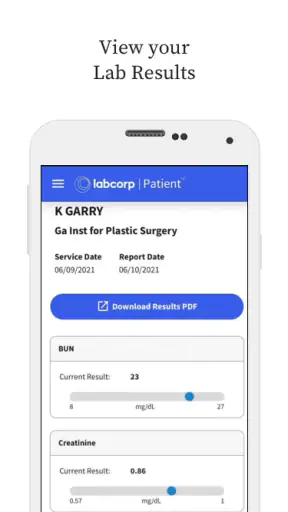
The results experience is valuable because it gives health information a more organized home than a collection of notifications. I can look back at results when preparing for a conversation with a clinician, checking whether a recently completed test has appeared, or gathering details before an appointment. I would not use the app to interpret a result on my own, though. A number can look reassuring or alarming without the medical context needed to understand it, so I treat MyLabcorp as an access and organization tool, not a replacement for professional advice.
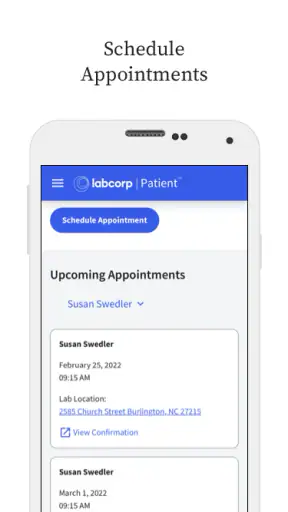
Appointments are another strong part of the routine. When a test requires planning around work, school, transport, or fasting instructions, being able to arrange the visit from a phone is more convenient than calling during opening hours. I especially like the idea of handling this while I am already looking at my calendar. The practical benefit is not just speed; it is reducing the chance that I will postpone the task and later discover that the available time no longer fits my day.
A realistic example is a weekday morning when I receive a reminder that a follow-up test needs to be arranged. Instead of leaving the message unread, I open MyLabcorp, look for an appointment that fits the rest of my schedule, and then keep the visit details with my other plans. Later, I can return to the same app to check whether the related result is available. That creates a repeatable loop: arrange the visit, complete the laboratory work, check the result, and use the information in the next conversation with a healthcare professional.
That loop is where the app feels more useful than a single-purpose appointment page. It connects two stages of the same healthcare errand without asking me to switch between a call log, a browser, and a separate results system. The convenience is modest but real, particularly for people who use Labcorp more than once or who help coordinate appointments for a family member.
What to check before relying on it
Before making the app part of my routine, I would make sure the account setup and sign-in details are ready. Medical apps are not ideal places for improvisation when I am standing in a waiting room or trying to review information quickly. I prefer to open MyLabcorp at home, verify that I can reach the parts I need, and then keep my login process manageable. This preparation is more important than downloading the app itself.
I would also check how appointment information fits with my personal calendar. The app can help arrange the Labcorp visit, but I still need to note practical details such as travel time, preparation requirements, and whether I need to avoid scheduling another commitment immediately afterward. A booking is not the whole plan. My habit is to confirm the location and time in the app, then add a separate reminder with any instructions I need to remember.
Notifications deserve a quick review as well. I do not want every medical reminder competing with ordinary phone alerts, but I also do not want to miss an important update. My preference is to keep useful appointment and result notifications available while avoiding a cluttered notification stream. The exact balance depends on how often I use Labcorp and how closely I am monitoring a particular test.
One setting-related habit is to keep the app current. The listed version is 11.2.0, and using the current release is sensible for an app that handles appointments and health information. Updating is not a guarantee that every problem disappears, but it reduces the chance that an old installation behaves differently from the service it connects to. If something looks wrong, I would first check the app version, connection, and account before assuming that a result or appointment has vanished.
Privacy is another reason to be deliberate with settings. A lock-screen preview can expose more health information than I intend if someone else can see my phone. I prefer notifications that tell me there is an update without displaying unnecessary medical detail. I also avoid leaving the app open on a shared device. These are ordinary phone habits, but they matter more when the screen may contain laboratory results.
MyLabcorp is free, which removes a financial barrier to trying it. That does not mean using it replaces every other part of the healthcare process. A free app can still require an account, a supported Labcorp workflow, and a reliable connection to be useful. I would not download it expecting a general health dashboard that combines every provider, pharmacy, or hospital I use.
Repeatable shortcuts that make the app less frustrating
The fastest users are not necessarily tapping faster; they are opening the app with a clear purpose. I recommend deciding whether the task is an appointment, a result check, or a return to information already reviewed. That small decision prevents wandering through the interface and makes the app feel much more focused.
For appointments, I use a simple sequence: check the day first, compare the available time with my actual travel plan, and only then confirm the visit. Choosing a time that looks open but leaves no room for traffic or preparation creates avoidable stress. I also take a moment to save the appointment details in my usual calendar system. That gives me a second reminder without pretending that the Labcorp app is my complete personal organizer.
For results, I avoid repeatedly checking at random intervals. A better habit is to check when I have time to read carefully and make notes for a clinician if needed. This is one of the less obvious advantages of a dedicated results area: I can separate the act of finding information from the emotional impulse to refresh constantly. If I am expecting something important, I still follow the instructions from my healthcare provider rather than relying only on an app alert.
Another useful pattern is to prepare questions while reviewing the result. I might note the test name, the date, and anything I do not understand, then take those notes to a professional. The app helps me retrieve the information, but the value comes from what I do with it afterward. This approach is safer and more productive than searching isolated numbers online and drawing conclusions without context.
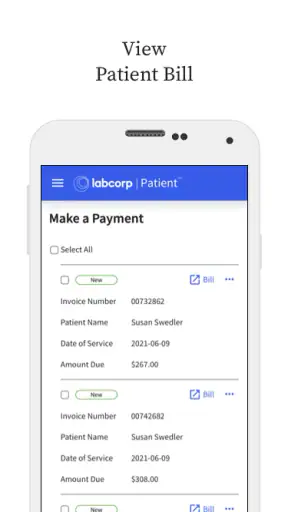
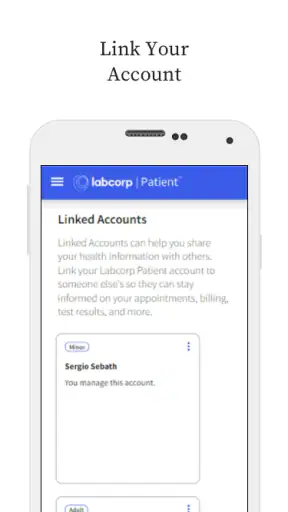
People who manage care for someone else should be especially careful about whose account is active. I would not assume that switching between family members is seamless or that one person’s health information should be stored under another person’s login. Keeping the account identity clear avoids the serious mistake of confusing appointments or results. When the app is used as part of family coordination, I would confirm names and dates every time rather than trusting memory.
I also find it helpful to use the app before leaving for an appointment, not only after arriving. Checking the planned visit details early gives me time to spot an incorrect day or location and resolve it before travel. In a medical workflow, five minutes of preparation can be more valuable than five minutes saved during booking.
These habits show the app’s real strength: it supports a consistent Labcorp routine. It is not trying to be an all-purpose wellness coach, and I would not want it to bury appointment and result tasks under unrelated content. Its narrower focus makes it easier to understand what I should do next.
Where the experience has limits
The first limitation is scope. MyLabcorp is useful for Labcorp-related results and appointments, but it is not a universal medical record. If I use several laboratories, hospitals, or specialist portals, I still need other systems. A general health-record service may be better for someone who wants one combined view across many providers, even if that service is less direct for a Labcorp appointment.
The second limitation is interpretation. Seeing a result in an app can create the impression that the important work is finished, when in reality the next step may be a discussion, repeat testing, or a change in treatment. I would not use a result screen as permission to start, stop, or alter medication. The app makes information easier to reach; it does not turn that information into a diagnosis.
Appointments can also involve practical details that a digital booking flow cannot solve by itself. A convenient time may still be unsuitable if I have not followed preparation instructions, cannot reach the location, or need a particular service. I would read any instructions connected with the visit and contact the appropriate healthcare or Labcorp support channel if the situation is unclear. The app is strongest for ordinary scheduling, not unusual cases that need personal guidance.
There is also a human factor. Some people are more comfortable calling, especially when they need to explain a complicated request or ask about accessibility, preparation, or a changed order. For them, the app may be a useful backup rather than the main channel. I would choose the phone when a conversation can prevent a mistake, and use MyLabcorp when the task is straightforward enough to handle independently.
Reliability matters too. A mobile workflow depends on the phone, the connection, the account, and the service behind the screen. I would not wait until the last moment to retrieve an appointment or result if I know I will need it during travel or at a consultation. Keeping the relevant details available through the app is convenient, but having a separate calendar note or clinician message can provide sensible backup.
The app’s age rating of Everyone makes it broadly approachable, but that should not be confused with medical simplicity. Health information can be sensitive and difficult to understand at any age. A younger user may still need a parent, guardian, or healthcare professional to help with account use and interpretation. Accessibility and confidence vary from person to person, so I judge the app by the task rather than by the age label alone.
Who benefits most, and who should choose another route
I would recommend MyLabcorp to someone who regularly uses Labcorp and wants a direct way to manage appointments and view results. It is also a good fit for people who dislike making routine calls, prefer checking information on their own schedule, or want a single place for the two most common parts of the Labcorp process. The free price makes experimenting with that workflow easy.
It is less compelling for someone who rarely uses Labcorp and already has a simple, reliable appointment routine. If a person only needs one visit and is comfortable calling, installing another medical app may not add much. Likewise, someone looking for medication reminders, symptom tracking, broad wellness tools, or a complete record from multiple providers should look for a service designed around those needs instead.
I would also hesitate to make it the only tool for a complicated medical situation. When results are urgent, confusing, or connected to symptoms that are getting worse, the correct response is professional medical help, not repeated app checks. MyLabcorp can support the conversation by making relevant information easier to find, but it should remain part of the care process rather than becoming the care process.
Compared with the usual alternatives, the app sits between a phone call and a general health-record platform. Calling may be better for exceptions and questions, while a broad record app may be better for combining providers. MyLabcorp wins when the task is specifically tied to Labcorp and I want a focused, self-service workflow. That trade-off is clear enough that choosing it does not require pretending it covers every healthcare need.
My final view after making it part of the routine
MyLabcorp is at its best as a practical access point, not as a medical decision-maker. I like it for the simple connection between arranging a Labcorp appointment and returning later to check related results. The experience becomes noticeably better when I use repeatable habits: prepare the account, review notification privacy, verify appointment details early, and read results with questions ready for a professional.
The app’s strong public reception, with an average of 4.6 and more than a million installs, supports the impression that it serves a real everyday need. Still, those figures should not replace personal judgment. A focused Labcorp tool will feel convenient to one person and limiting to another, especially if their healthcare is spread across many organizations.
After using it, I would keep MyLabcorp installed if Labcorp is part of my regular care. I would not rely on it as my only calendar, medical record, or source of interpretation. That balanced role is exactly why I can recommend it: it removes friction from two specific tasks without promising to solve the entire healthcare experience. For routine Labcorp users, that is a worthwhile improvement; for everyone else, a phone call or broader health platform may be the better fit.


